
Find what slows your Elementor page.
Know what to fix next.
Start with useful diagnostics and supported fixes for free. Add Pro when you need lighter local images, page-specific asset cleanup and more control over rendering.
Built for Elementor Free and Pro. Works alongside your cache plugin.
Free tools that help you
stop guessing.
Find the problem in the page
Buraq flags page issues. X-Ray helps you locate the affected Elementor element, so you can work on the right part of the design.
Fix supported image issues
Add missing dimensions to eligible local images and review supported lazy-loading fixes to address avoidable movement and loading problems.
Understand your assets
Inspect CSS and JavaScript sources with the profiler, Page DNA and usage insights. Apply global controls where your setup supports them.
Keep fonts closer to home
Self-host supported Google Fonts and review the result on your live pages. Keep font ownership clear if another optimizer handles fonts.
Test supported changes
Use Test Mode for supported frontend controls. Review Settings History and supported Auto-Revert coverage before you release a change.
Check the result
Run an on-demand Lighthouse check and compare the same page and device. A lab score is a diagnostic signal, not a guaranteed visitor experience.
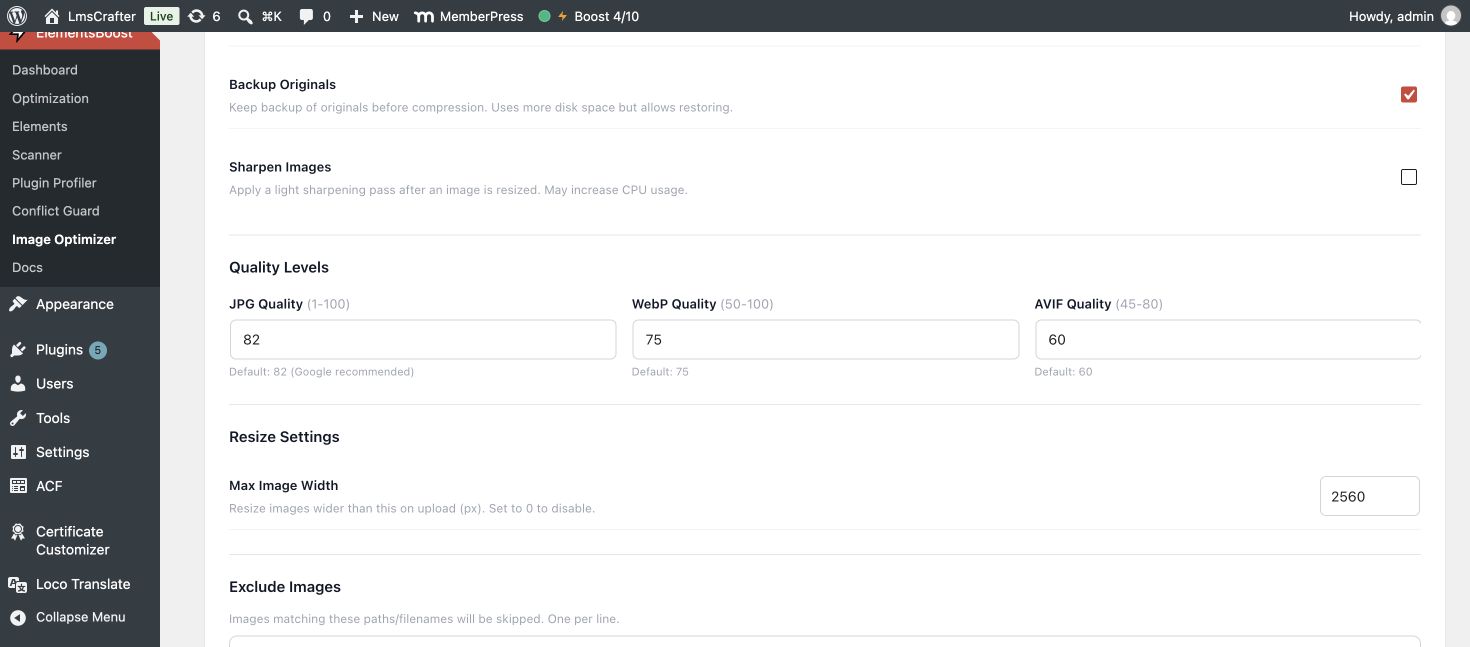
Smaller image files.
The detail you want to keep.
Compress eligible Media Library images and create verified smaller WebP or AVIF alternatives on your own server.
- Choose quality and resizing controls.
- Process eligible images in bulk.
- Keep original-file backups and restore when needed.
No external image API fees. Available formats depend on your server and source files. Remote media and animated GIF conversion are not universally supported.
Go from diagnosis
to a focused improvement.
Remove assets only where appropriate
Lean Mode creates supported page-specific rules. Safe Preview lets you inspect the candidate output before making a rule public.
Prioritize the first screen
Generate separate mobile and desktop Critical CSS. Review supported LCP image candidates instead of preloading every image.
Control when scripts run
Dependency-aware JavaScript delay and defer help you handle non-critical scripts. Check menus, forms and sliders after every change.
Keep comparable measurements
Save PageSpeed history, compare matched three-run medians and monitor selected pages using your own PageSpeed API key.
Go deeper into the page
Deep Scan adds eligible heading and meta actions to your diagnosis. Review each recommendation in the context of the page.
Get help as you grow
Every Pro plan includes the Free foundation, updates and priority support. Choose 1, 5 or 20 licensed sites; the feature set stays the same.
What’s Free. What Pro adds.
Start with the tools your current problem needs. Pro includes the Free foundation.
| What you need | Free | Pro adds |
|---|---|---|
| Page diagnosis | Buraq findings, X-Ray and asset insights | Deep Scan and eligible heading/meta actions |
| Asset cleanup | 14 global controls, profiler and compatibility guidance | Per-page Lean Mode and advanced addon rules |
| Images | Eligible local image dimensions and supported lazy-loading fixes | Local compression, WebP/AVIF, bulk processing and file backups |
| Fonts | Self-host supported Google Fonts | Part of a broader rendering workflow |
| Testing and recovery | Test Mode for supported controls, Settings History and supported Auto-Revert | Safe Preview for supported per-page rules |
| PageSpeed | On-demand Lighthouse checks | Saved history, matched three-run medians and scheduled monitoring |
| Rendering | Diagnostics and guidance | Critical CSS, JavaScript delay/defer and supported LCP controls |
| Support | Community support | Priority support |
Preview, testing and recovery coverage depends on the action. Persistent content edits need their own backup. ElementsBoost does not provide a full-page cache or CDN.
One page. One change.
A result you can check.
Find the bottleneck
Inspect the page and record a baseline before changing settings.
Make a focused change
Use supported previews, then check key interactions on desktop and mobile.
Measure the public page
Clear relevant caches and retest under matching conditions. Keep changes that help.
Start Free.
Unlock Pro when you need more.
Every Pro feature. From $29 per year for one website.